Work Orders: What They Record and How to Keep Each One Accurate From Request to Close
Drafted with AI assistance, edited and fact-checked by Sean Flannery. See our editorial policy.

A work order is the record of a single job: what is needed, where, who owns it, when it is scheduled, what happened on site and whether it is confirmed complete. Teams that update its status at each stage, and close it only with proof such as a photo, signature or timestamp, keep schedules and customer updates accurate.
The final step is where a job queue drifts out of date. An open work order can mean a job in progress, a job waiting on a part, or a job that finished on Tuesday and was never closed.
When all three look identical on screen, planning tomorrow gets harder and customer updates lose their footing. The fix is small: a handful of clear stages, proof at the moment the work is done, and one short review each week.
What a work order records, from first request to confirmed close
Think of a work order as a record that grows as the job moves, not a form filled in once.
It starts as a request: who asked, what they need, the site address and the best contact. At that stage it is a service request, often incomplete and not yet approved.
It becomes a work order once someone confirms the scope, sets a priority, assigns an owner and books a date. Give it a unique reference at that point, because every later note, part, photo and invoice will hang off it.
On site, the record picks up what actually happened: arrival time, work done, parts used and anything the next visit needs to know.
At close, it holds proof that the job is finished, who accepted it, and whether it is ready to invoice or needs a follow-up.
A field list only gets a team part of the way. The sequence matters more. When each layer is added by the person closest to it, at the moment it happens, nobody has to rebuild the job from memory at the end of the week.
How clear status stages, including hold states, keep the job queue accurate
A status should tell the office what is true right now, with no guessing.
A simple set of working stages looks like this: requested, scheduled, assigned, en route, on site, completed and closed.
Completed and closed are deliberately separate. Completed means the technician has finished and captured proof. Closed means someone has checked that proof, the notes and the parts, and the job has moved to invoicing.
Jobs that are waiting on something deserve names of their own. Awaiting parts, awaiting customer and reopened each mean something different, and each needs a reason and a review date attached.
A job left at on site for days while a part is on order makes the board look busier than it is. Move it to awaiting parts with a review date and the queue is accurate again.
Status changes are also the natural trigger for customer updates: a confirmation when the job is scheduled, a tracking link when the technician is en route, and a completion note with proof when the work is done.
Give closing one owner. In a small team, make that the person running the office. The technician marks the job completed with proof, and the office closes it after a quick check.
How proof of completion with photos, signatures and timestamps closes each job with confidence
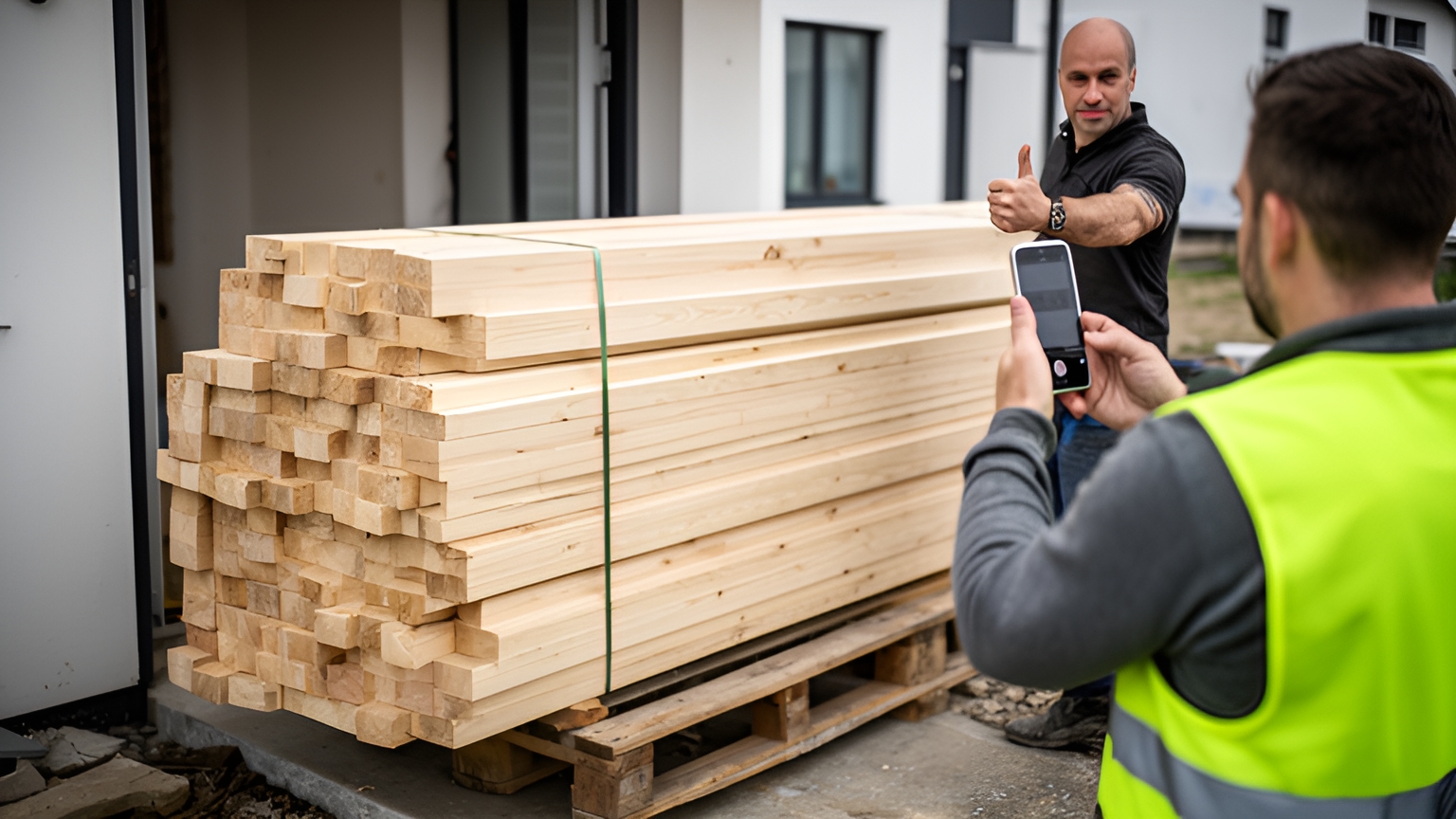
Franz Building Supplies is a building materials company that delivers heavy and bulky products to construction sites, builders and trade professionals, whose projects depend on timely, accurate deliveries. The team wanted better visibility of daily deliveries and a reliable way to show each one was completed correctly.
Without a clear record of what was delivered, when and where, questions about an order were hard to settle. Stronger team accountability and a better customer experience were on the list too.
Franz put Locate2u's proof of delivery in place, capturing photo evidence, signatures and timestamps for every delivery. Drivers photograph each delivery on site, creating a record the company and the customer can both refer to.
The team also began sharing live tracking links, so customers could see in real time when a delivery would arrive.
For this one business, the result came in its own words: "What I love about Locate2u is the live-tracking features and proof of delivery. Our customer disputes dropped to nearly zero."
A building-supplies delivery is not a repair visit, but the closing step works the same way. The job ends with a record both sides can open.
For field work orders, a short proof standard covers it:
- a photo of the finished work, plus any reading or label the job involved
- a signature or name from the person who accepted the work
- a timestamp and location captured at the moment of completion
- a short note on anything left for a follow-up visit
Make the rule simple: no proof, no completed status. This guide to what proof of delivery means explains how these records work in more detail.
To test it on your own jobs, require a photo and a signature before any job moves to completed for one week. Then note how often the office still needs to call a site to confirm the work.
How lighter admin gives technicians more of the day for skilled work
Every minute spent on paperwork is a minute away from the skilled part of the job. That is a process question, and a solvable one.
Research published by McKinsey in 2019 found that field technicians can spend up to 40 percent of their workday on non-value-adding activities, such as filling out timesheets.
That finding covers admin in general, not work-order updates specifically. Status capture is one clear place to lighten the load, because it happens on every job, several times a day.
Start by sending the job details to the technician's phone with the work order, so nothing is copied twice. The site address, contact, scope and notes from the last visit should already be there when the job opens.
Next, make each status change a single tap. When you assess a mobile app for this, check that each update records the time automatically, so the office gets arrival and finish times without a separate form at the end of the day.
Then let photos do the describing. A clear photo of a finished install says more than a paragraph typed on a phone, and it takes seconds.
Why does this matter so much? Skilled field time is in demand. The US Bureau of Labor Statistics projects about 569,000 openings a year, on average, in installation, maintenance and repair occupations, and reports a median annual wage of $59,620 for this group in May 2025.
For a team hiring into that market, protecting the hours already on the roster is the practical first move. Before adding headcount, check how much of the current week goes on forms and phone updates that a well-built work order could carry instead.
How real-time dispatching gets technicians to sites quickly, even with one person running the office
Fast dispatch depends on seeing the whole day at once. When a job overruns or an urgent request lands, the person in the office needs to know who is free, who is nearby and which customer to update.
McKinsey's 2019 work on field operations reports that dynamic dispatching systems, which put field technicians at job sites quickly and react to changes in real time, can deliver total savings of 5 to 20 percent in labour costs.
A separate 2019 McKinsey article on lean field forces describes splitting dispatch into a customer-facing dispatcher and an exceptions controller, an approach that reduces idle time and periods when no work is allocated.
In a small team, one person can cover both roles by splitting the day into two modes.
Planning mode comes first, ideally early in the day. Confirm bookings, sequence the jobs, check each technician has the parts for what is assigned, and send customers their confirmations.
Locate2u's dispatch planning builds routes from job addresses, time windows and driver availability, so the plan takes shape without a whiteboard.
Exceptions mode runs for the rest of the day. Watch the live map, move waiting jobs into hold states, slot urgent work into the nearest gap and send a revised arrival time when a job runs long.
Locate2u's real-time tracking gives the office a live view of where drivers are, and customers can follow a live tracking link to their arrival.
Drive time belongs in the same picture. McKinsey's 2020 work on field-force performance management estimates companies can capture productivity improvements of about 10 to 20 percent by reducing discretionary time, improving job efficiency and reducing drive time.
For a one-person office, the decision that follows is clear: protect the planning block each morning, and let the live view carry the rest of the day.
What whole-process improvements achieved in reported field-service cases
Results from broader field-service programmes show what is possible, as long as they are read as single cases rather than benchmarks.
In one case example from McKinsey's 2019 article on lean field forces, on-site productivity rose by 20 percent, customer satisfaction rose by nearly 50 percent and the number of repeat visits for servicing fell by half.
A 2025 Boston Consulting Group article describes one field-service deployment that reported a 5% to 10% boost in daily productivity for technicians and field leaders, a 15% to 20% reduction in job duration and a 10% to 20% improvement in rework rates for troubleshooting jobs.
Both are single reported cases, and both came from programmes that changed how the field process ran, not from one form or one status field.
The part a small team can copy is measurement. A reopened status gives a running count of repeat visits, and the gap between completed and closed timestamps shows how long jobs wait for the last step.
Track both before and after any change, and the team will have its own figures to judge progress by.
A weekly review a small team can run in one sitting to keep every job current
A queue stays accurate when someone looks at it on purpose. A short weekly review, run by the person who owns closing, catches drift before it reaches a customer.
Pick the same slot every week, open the work-order list filtered by status, and work through these checks in order.
| Check | What to look for | Action |
|---|---|---|
| Completed, not closed | Jobs with proof captured but no final check | Review the proof and close, or note what is missing |
| Hold states | Awaiting parts or awaiting customer with no review date | Add a reason and a date, or move the job back into the schedule |
| Older than normal | Jobs sitting in one status longer than your usual turnaround for that job type | Call the site or reassign, then update the status |
| Reopened jobs | Any job reopened since the last review | Read the closure notes and photos together to plan the next visit |
| Repeat sites | The same site or asset coming back with the same fault | Book a planned visit instead of another reactive call |
| Customer updates | Scheduled jobs whose customer has no confirmation yet | Send the confirmation and tracking details |
Remember the job that finished on Tuesday and was never closed? This is where it surfaces, on the first line, with its proof already attached.
Set your own thresholds. A team doing quick callouts will define older than normal differently from one running multi-day installs, and that is exactly right.
Keep the review short. If one check keeps surfacing the same kind of job, change the step upstream that creates it rather than fixing it again each week.
Start with the stages and the proof rule, then add the weekly review once they feel routine. The Locate2u driver app gives drivers a place to capture photos, signatures and timestamps on site, and you can book a call with the Locate2u team to see how it fits your own job types.
Frequently asked questions
What is the difference between a work order and a purchase order?
A purchase order authorises buying goods or services from a supplier, while a work order authorises and records labour on a specific job. One job can have both: the work order tracks the visit, and any purchase order covers parts bought for it.
What is the difference between a service request and a work order?
A service request is the customer's ask, often incomplete and not yet approved. It becomes a work order once someone confirms the scope, sets a priority and assigns an owner and a date.
Does every work order need its own unique number?
Yes. A unique reference lets the office, the technician and the customer talk about the same job, and it ties parts, site notes, completion proof and the invoice to one record.
Can delivery management software schedule and record field jobs?
Where field jobs share a delivery workflow, with an address, a time window, an assigned driver and proof at completion, Locate2u can plan them as stops and capture photos, signatures and timestamps on completion. To check fit against your own job types, book a call with the Locate2u team.