
Locate2u Core 3.8.0 Release Notes
Summary
Locate2u Core 3.8.0 delivers major performance improvements to location tracking infrastructure, expanded Integration API capabilities, and a significantly streamlined Uber carrier onboarding experience.
This release also enhances trip visibility with run schedule information and improves route management reliability.
Features
Integration API – Stop Import Endpoint
Feature Details:
(Enterprise Customer Feature)
- Introduced a new stop import endpoint in the Integration API, allowing customer-specific applications to create stops programmatically.
- TeamId and CustomerId are automatically derived from the authenticated app credentials.
- Stops with mismatched team or customer IDs are skipped automatically, with logging applied to maintain data integrity.
- This endpoint is available exclusively to customer-specific apps created in the App Portal.
Use Case:
Enterprise customers with external order or dispatch systems can now import stops directly into Locate2u using their dedicated integration credentials. Automatic scoping reduces payload complexity while ensuring strict data isolation.
Uber Self-Onboarding Wizard
(Carrier Marketplace Feature)
Feature Details:
- Introduced a self-service onboarding wizard for Uber Direct, replacing the previous manual, email-based activation process.
- Team administrators can complete onboarding directly via Settings → App Portal by submitting company name, email, and business location.
- Once submitted, the Uber carrier connection is immediately activated.
- Administrators receive an invitation email from Uber Direct to complete billing configuration.
- The wizard auto-populates fields from the team’s Business Entity or Team Profile when available.
Use Case:
Teams can now onboard with Uber Direct in minutes instead of days, without support intervention. This dramatically reduces setup time and accelerates access to Uber’s delivery network.
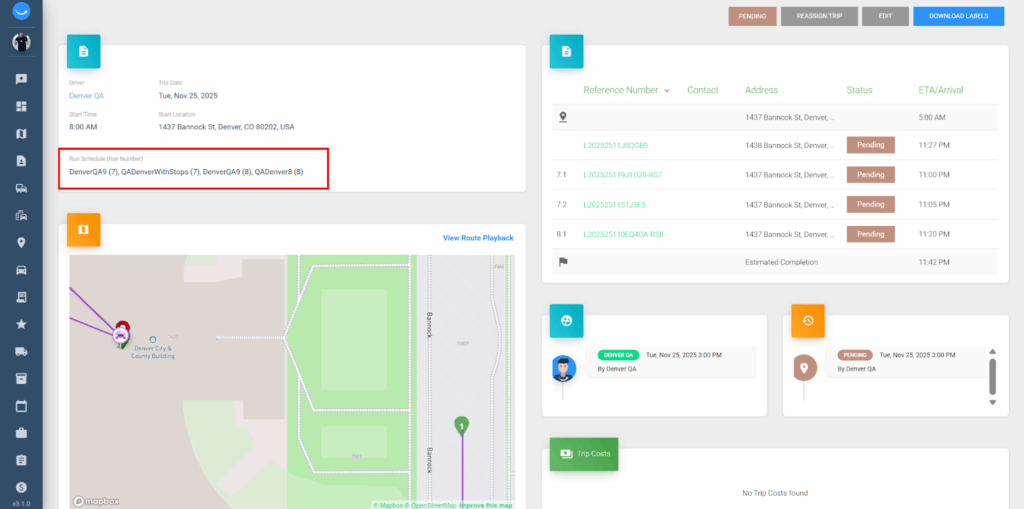
Run Schedule Display on Trip Details
Feature Details:
- Trips generated from a run schedule now display the originating run schedule name and run number in the trip details view.
- Displayed in the format: RunScheduleName (RunNumber).
- This field appears only for trips created from a run schedule; manually created trips are excluded.
Use Case:
Dispatch and operations teams can quickly trace trips back to their originating run schedules, improving transparency, troubleshooting, and verification of scheduled route execution.
Orders Import – Team Region Field
Feature Details:
- The orders import API now accepts an optional teamRegionId field.
- The system validates that the provided region belongs to the authenticated team.
- Invalid region assignments are rejected.
Use Case:
Multi-region organizations can ensure imported orders are automatically associated with the correct regional teams, simplifying visibility, assignment, and operational workflows.
Enhancements and Improvements
- Improved stop status change reliability.
- Enhanced route order persistence for locked trips, ensuring manually reordered stops retain their sequence during optimization.
- Added source reference support in shipment exports, improving traceability and downstream system integration.
- Improved webhook event handling by filtering out vehicle speed events with empty event types, reducing log noise.
- Corrected timezone handling for 30-minute offset regions (e.g. South Australia), preventing duplicate trip rebuilds and improving system efficiency.
- Resolved empty trip unassignment issues, allowing drivers to be unassigned from trips with no stops without errors.
- Improved failed stop route handling, ensuring failed stops are marked as completed rather than remaining pending in routes.
Locate2u Core 3.9.0 Release Notes
Summary
Locate2u Core 3.9.0 introduces comprehensive audit logging for team member profiles, intelligent duplicate SMS suppression to prevent notification spam, and expanded team region support at the order level.
This release also delivers enhanced search capabilities using member codes, new item movement statuses for warehouse operations, and tax-aware invoice email templates.
A wide range of improvements across webhooks, invoicing, and trip search functionality further improve reliability and operational confidence across all workflows.
Features
Team Member Profile History Log
Feature Details:
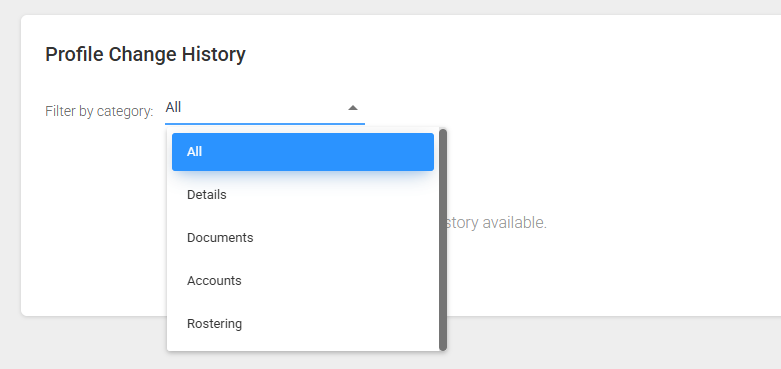
- A new unified History section has been added to the bottom of the Team Member Profile page.
- Displays historical changes across Details, Documents, Accounts, and Rostering tabs.
- Each entry records the timestamp, category, field changed, previous value, new value, and the user who made the change.
- Users can filter history entries by category or view all changes.
- Sensitive banking information (Account Name, BSB, Account Number) remains masked for security.
- Visibility is restricted to Team Managers and Team Owners only.
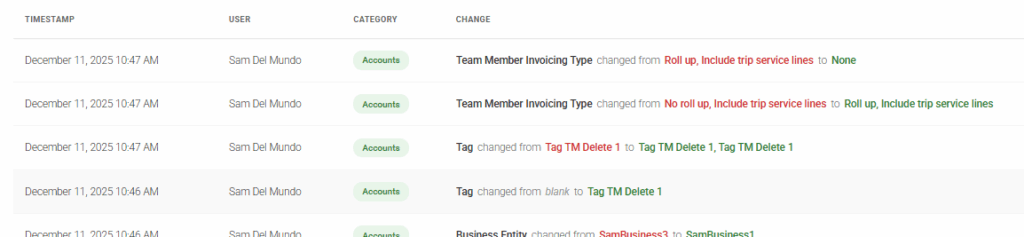
Use Case:
Operations and HR teams can now fully audit team member profile changes for compliance and accountability.
When resolving disputes related to payments or account settings, managers can quickly identify what changed, who changed it, and when.
Team Region on Orders
Feature Details:
- Added a Team Region field to orders, visible on both the Order Details page and Orders list grid.
- Stops created from an order automatically inherit the order’s team region.
- The Team Region column supports filtering, sorting, and column selection.
- Order imports now support team region assignment with validation to ensure the region belongs to the authenticated team.
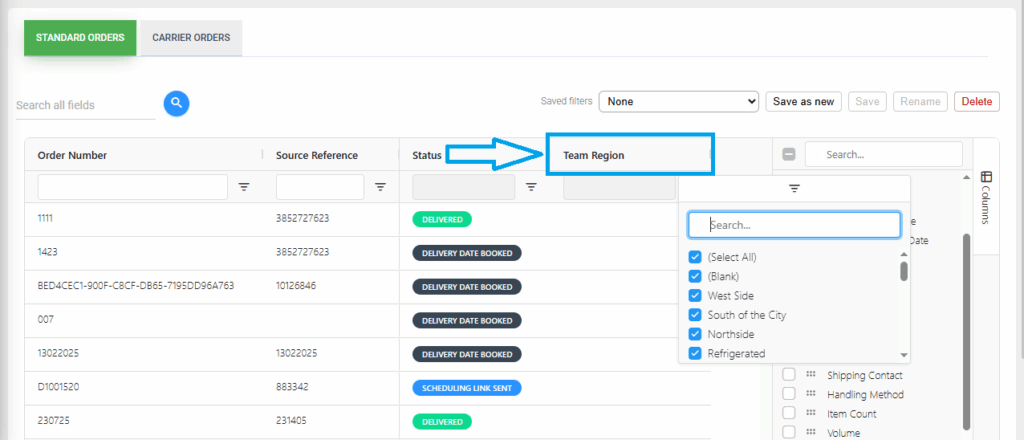
Use Case:
Multi-region organizations can assign orders at the regional level, ensuring correct visibility, reporting, and stop assignment without requiring manual updates at the stop level.
New Item Movement Statuses
Feature Details:
- Added two new item statuses: Received and Transferred.
- Each status includes distinct color coding for quick visual identification.
- Available across item lists, sidebars, detail pages, and filters.
- Fully integrated into existing item workflows and warehouse scanning functionality.
Use Case:
Warehouse teams gain clearer visibility into item movements during receiving and transfer operations, improving inventory accuracy and traceability throughout the warehouse lifecycle.
Team Member Invoice – Tax-Based Email Templates
(Enterprise Customer Feature)
Feature Details:
- Invoice email behavior now respects the team member’s Apply Tax for Invoicing setting.
- Team members with tax disabled receive a simplified payment summary email from the Drafts tab.
- The Release tab email action is disabled for non-taxed team members.
- Team members with tax enabled continue to receive standard invoice emails with RCTI attachments.
- Works in conjunction with the team-member-invoice-draft-approval feature toggle.
Use Case:
Finance teams can ensure the correct invoice communication is sent based on each contractor’s tax status, improving compliance while reducing confusion for non-taxed contractors.
Member Code Search Enhancement
Feature Details:
- The Team Members page search now supports searching by member code in addition to name.
- Member code search has been extended to filters across:
- Trips,
- Stops,
- Shipments,
- Map,
- Team Member Invoices,
- Review Charges,
- Run Schedules,
- Team Member Documents, and
- Reports.
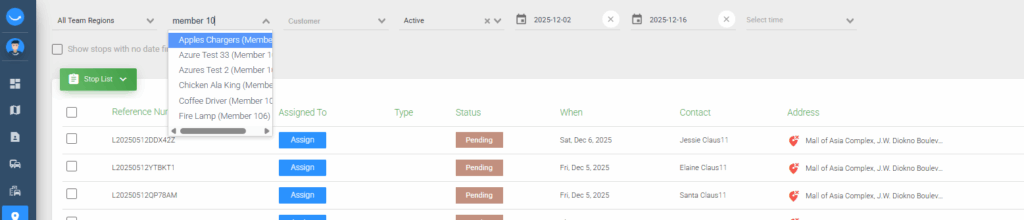
Use Case:
Dispatch and operations teams managing large driver pools can quickly locate team members using familiar employee codes, significantly improving navigation speed and assignment accuracy.
Team Member Invoice Deletion Sync
Feature Details:
- Added a background process to synchronize invoice deletions with connected accounting systems.
- When a team member invoice is deleted in Locate2u, the corresponding invoice is automatically marked as Cancelled in supported accounting platforms.
Use Case:
Finance teams can confidently delete invoices knowing that accounting records remain consistent across systems, simplifying reconciliation and audit processes.
Enhancements and Improvements
- Improved trip details layout by repositioning the Services section below Costs and Charges for clearer financial review.
- Corrected order status change logging, ensuring events like Scheduling Link Sent are accurately recorded.
- Enhanced Xero invoice formatting for customers, including driver code, invoice number, date, and team region in references.
- Corrected trip service line calculations to ensure accurate display of ancillary service charges and costs on invoices.
- Corrected team region filtering on the Review Charges page, ensuring the NONE filter behaves correctly.
- Improved item status badge colors for consistency across Order and Stop details pages.
- Corrected Order SMS wizard date display to show the actual Ready Delivery Date.
- Enhanced trip page search behavior, filtering the driver list to show only drivers related to matching trips.